Quick Answer
In 2026, companies should avoid web design trends that reduce usability, slow down performance, frustrate mobile users, or distract visitors from taking action. The best design choices are the ones that make your website faster, clearer, more accessible, and aligned with your brand goals.
Web design plays a key role in attracting visitors, building trust, and driving conversions. While new styles, interactive elements, and technologies create fresh opportunities, some trends hurt usability, website performance, and navigation. For businesses building or updating a website, understanding the web design trends to avoid is as important as following new design practices. Effective web design should focus on a clean appearance, easy navigation, fast performance, accessibility, and a seamless user experience.
Key Takeaways: Web Design Trends to Avoid
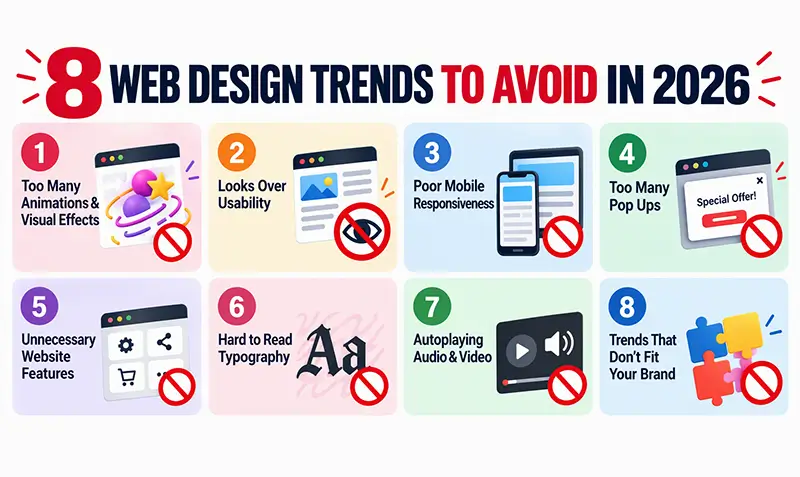
- Excessive animations and visual effects that distract users or slow pages.
- Designs that prioritize visual appeal over usability and clear navigation.
- Poor mobile responsiveness.
- Intrusive or excessive pop-ups.
- Unnecessary features, plugins, scripts, or media that increase page load time.
- Small, low-contrast, or difficult-to-read typography.
- Autoplaying audio and video.
- Design trends that do not align with the brand, audience, or business goals.
Common Web Design Trends That May Hurt Your Website
- Overly Complex Animations and Visual Effects: Animations can guide users – but too many moving elements, parallax effects, transitions, and animated backgrounds distract visitors and slow down pages. Heavy animation also increases mobile load times. Use animation only when it improves clarity or highlights important information.
- Designs That Prioritize Appearance over Usability: A beautiful website is useless if visitors can’t find what they need. Trends like oversized typography, experimental layouts, and unconventional navigation often hide essential information. For business websites, clarity, simplicity, and intuitive navigation should always come first.
- Ignoring Responsive Web Design: A design that works on desktop but breaks on mobile is a major UX failure. Responsive design ensures menus, images, and content adapt smoothly across devices. Test your website on multiple screen sizes-especially mid‑range Android devices, which represent a large portion of global traffic.
- Excessive Use of Pop-Ups: Pop‑ups can be helpful, but too many-especially on entry-interrupt the browsing experience. Poorly designed pop‑ups may block content or become impossible to close on mobile. Use pop‑ups sparingly and only when they provide genuine value.
- Heavy Websites with Unnecessary Features: Large videos, unoptimized images, excessive plugins, and third‑party scripts slow down websites. Slow pages increase bounce rates and hurt SEO. Audit your site regularly to remove outdated plugins, compress media, and streamline code.
- Tiny or Difficult-to-Read Typography: Creative fonts add personality, but readability is non‑negotiable. Tiny text, low contrast, and decorative fonts reduce comprehension and accessibility. Use clean, readable fonts with proper spacing and WCAG‑compliant contrast ratios.
- Autoplaying Audio and Video: Unexpected audio is one of the fastest ways to make visitors leave a site. Autoplaying media is especially disruptive in workplaces or public spaces. Allow users to control playback and avoid automatic sound.
- Following Every New Trend Without Considering the Brand: Just because a trend is popular doesn’t mean it suits your business. Trend‑driven designs may clash with your brand identity or confuse your audience.
Choose design elements that support your brand, improve navigation, and help visitors take action.
Ready to refresh your website?
Get expert web design support to build a modern, user-friendly site.
How to Choose Better Web Design Trends
The best approach is not to avoid innovation altogether. Instead, businesses should evaluate new trends based on practical outcomes. When reviewing outdated web design trends to avoid, consider these questions:
- Does the design make information easier to find?
- Does it work smoothly on mobile devices?
- Does it support accessibility?
- Does it improve or hurt loading speed?
- Does it simplify navigation?
- Does it support SEO and user experience?
- Does it align with the brand and audience?
- Does it help visitors complete an important action?
Run through these questions before every redesign or major update. Tools such as Google PageSpeed Insights and the WAVE accessibility checker help confirm speed and accessibility on real pages.
Learn eight effective ways to improve page loading speed and deliver a better user experience.
FAQs
What web design trends should businesses avoid in 2026?
Avoid excessive animations, intrusive pop‑ups, complex navigation, poor mobile design, and features that slow down performance.
Why should businesses avoid overly complex web design?
Complex designs distract visitors and make navigation difficult.
How does responsive web design improve user experience?
It ensures content and navigation work properly across desktops, tablets, and mobile devices.
Are pop-ups bad for business websites?
Not inherently-but excessive or poorly timed pop‑ups disrupt the user experience.
How should businesses choose web design trends in 2026?
Evaluate trends based on usability, performance, accessibility, mobile responsiveness, brand alignment, and user goals.
Choosing Lasting Design Over Passing Trends
Effective web design is not about following every new trend. It’s about building a website that is fast, accessible, easy to navigate, visually consistent, and genuinely useful. By avoiding distracting or outdated trends, businesses can create websites that remain modern, user‑friendly, and high‑performing–even as design styles evolve.
Move beyond outdated design trends. Our experts will help create a modern, user-friendly website that supports your business goals.