Creating a strong presentation is not just about attractive slides or creative visuals. The real impact of any presentation comes from the content delivered through those slides. Whether you are presenting in a boardroom meeting, pitching to clients, or sharing ideas with your team, the quality of your PPT content determines how well your message is understood and remembered. Poorly written slide content may confuse audiences, while well-structured and thoughtful PowerPoint content appeal quickly.
Professional presentations require clear messaging, structured information, and meaningful insights. This is where PPT content writing tips can help. Writing effective slide content ensures your presentation communicates the right message, keeps the audience engaged, and supports your spoken explanation. By focusing on clarity, relevance, and audience needs, you can create engaging presentation content that leaves a lasting impression.
Why Impactful Content Matters for Business Presentations
In professional environments, presentations are used to communicate strategies, report performance, present proposals, or explain new ideas. This is why impactful content matters for business presentations more than many people realize. When your PowerPoint presentation content is clear and meaningful, it helps decision-makers quickly understand the key points and take action.
Strong PPT content also builds credibility. Well-organized slides demonstrate preparation, professionalism, and expertise. On the other hand, cluttered slides or vague information can make a presentation appear unprofessional and difficult to follow.
Another reason impactful content matters is audience engagement. Business audiences typically have limited time and attention. Clear and concise engaging presentation content ensures your message is delivered efficiently without overwhelming the audience. Ultimately, effective presentation content improves communication, supports better decision-making, and increases the chances of achieving your presentation goals.
Want to create more engaging PPT presentations?
Connect with our content writing experts today.
Tips for Creating Clear and Concise PPT Slides
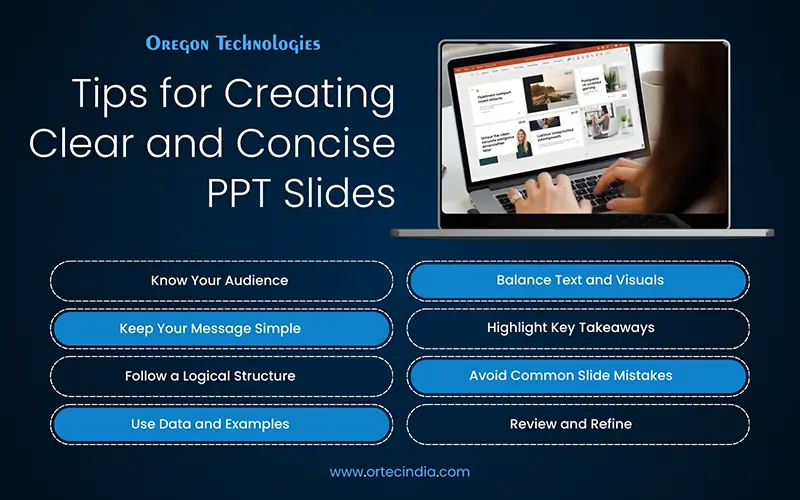
Here listed are some tips for creating clear and concise PPT slides that help present information in a simple, organized, and easy-to-understand way for your audience:
- Understand Your Audience before Writing PPT Content: A presentation designed for executives will be very different from one intended for students or team members. Consider what your audience already knows about the topic and what information they expect to gain from the presentation. When you tailor your PowerPoint presentation content to the audience’s level of knowledge and interests, the message becomes more relevant and easier to understand. For example, business leaders may prefer concise insights and key statistics, while technical teams may expect detailed explanations. Knowing the audience helps you decide the tone, level of detail, and type of engaging presentation content that will work best.
- Focus on Clear and Concise Messaging: Many presenters make the mistake of filling slides with large paragraphs of text. Slides are meant to support the speaker, not replace them. Use short sentences, bullet points, and key phrases to communicate your message. This approach improves readability and keeps the audience focused on the main ideas. When writing PowerPoint presentation content, aim to highlight only the most important points while explaining the details verbally during the presentation. Concise slides also improve audience engagement.
- Structure Your Presentation Content Logically: Without a logical flow, even valuable information can become confusing. Start your presentation with an introduction that outlines the topic and objectives. Follow this with the main content, where you explain key ideas, insights, or solutions. Finally, conclude the presentation by summarizing the key takeaways and suggesting next steps. This logical sequence ensures that your PPT content is easy to follow. When audiences can clearly see how one point connects to the next, they are more likely to stay engaged throughout the presentation.
- Use Data and Examples to Strengthen PPT Content: Adding credible data helps make your PowerPoint presentation content more convincing and informative. For instance, if you are presenting marketing results, including performance metrics or growth statistics can support your message. Data visuals such as charts and graphs make complex information easier to understand. However, it is important not to overload slides with too much data. Choose the most relevant information and present it clearly to maintain engaging presentation content.
- Keep Slides Visually Balanced: Although content is the main focus, visual presentation also plays an important role. Effective PPT content writing tips include balancing text with visuals. Slides that contain only text can quickly become dull and difficult to read. Adding visuals such as icons, images, or simple graphics can enhance understanding and maintain audience interest. When combining visuals with PPT content, ensure they support the message rather than distract from it.
- Highlight Key Messages and Takeaways: One of the best tips for creating effective PPT content for professional presentations is emphasizing the most important ideas. Use headings, bold text, or highlighted sections to draw attention to critical points. This approach helps the audience quickly identify the main message of each slide. When audiences clearly understand the key points, they are more likely to remember the information after the presentation ends.
- Avoid Common PPT Content Mistakes: Even experienced presenters sometimes make mistakes when creating slides. Avoiding these errors can significantly improve your PowerPoint presentation content. Some common mistakes include:
- Adding too much text to slides
- Using complex language or jargon
- Presenting unrelated information
- Using inconsistent formatting
By focusing on clarity and relevance, you can ensure your PPT content remains professional and effective.
- Practice and Refine Your Presentation Content: Review your slides and check whether the content flows logically from one point to the next. Remove unnecessary information and refine sentences to improve clarity. Practicing also helps you identify areas where the presentation content may need simplification or better explanation. Continuous improvement is key to developing strong presentation skills.
Make your next presentation more engaging and memorable with effective PPT content.
The success largely depends on the quality of its PPT content. By following practical PPT content writing tips, presenters can create clear, structured, and engaging content that effectively communicates their ideas.
From understanding the audience to organizing information logically and highlighting key messages, every step contributes to stronger PowerPoint presentation content. Businesses that want more polished and impactful presentations can also benefit from professional content writing services that help structure ideas clearly and present them effectively. Follow the above-discussed tips to create effective PPT content for professional presentations. Deliver impactful presentations that inform, persuade, and inspire your audience.