
Corporate presentations play an important role in communicating business ideas, presenting strategies, sharing performance reports, and engaging clients, employees, and stakeholders. However, even the most valuable information can lose its impact when presentation slides are overcrowded, unclear, or poorly structured. Creating effective PPT content requires more than adding text to PowerPoint slides. It involves organizing information, understanding the audience, using clear messaging, and presenting ideas in a visually engaging way.
Whether you are creating a sales presentation, employee training deck, business proposal, or executive report, implementing corporate PPT content best practices can make your presentation more engaging, impactful, and effective.
This post explores how to create effective corporate PPT content that makes an impact.
Need professional corporate presentation content?
Get audience-focused PPT content designed to make your presentations engaging, effective, and impactful.
Strategies for More Effective Business Presentations
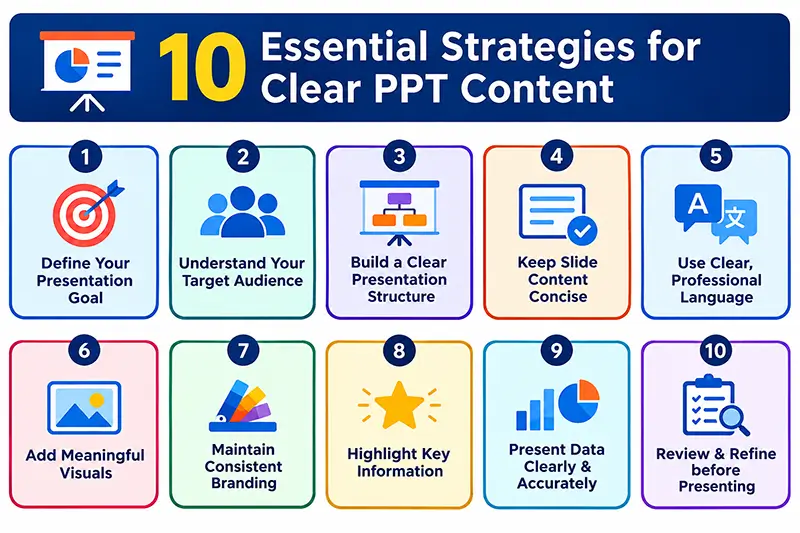
Effective business presentations combine clear messaging, logical structure, engaging visuals, and audience-focused content. Below discussed are some top strategies that help communicate key ideas clearly and keep audiences engaged:
- Understand the Purpose of Your Presentation: Start by defining the main goal of your presentation. A clear objective helps you include only relevant information and avoid unnecessary content. Consider:
- What is the purpose?
- Who is the audience?
- What information do they need?
- What action should they take?
- How much time do you have?
- Know Your Target Audience: Your corporate presentation content should match your audience’s needs, knowledge, and expectations. Use the right tone, language, and level of detail. For example, an executive presentation should focus on key results, business outcomes, and recommendations, while a training presentation may require more explanations and examples.
- Create a Clear Presentation Structure: Organize your slides in a logical order so the audience can easily follow your message. A typical corporate presentation can include:
- Title: Introduce the topic.
- Introduction: Provide context and purpose.
- Key Points: Present the main information.
- Supporting Details: Include relevant data or examples.
- Recommendations: Share solutions or next steps.
- Conclusion: Summarize the key message.
- Call to Action: Explain what should happen next.
A clear structure makes PowerPoint presentation content easier to understand and follow.
- Keep Slide Content Concise: Avoid overcrowding slides with long paragraphs or excessive information. Use short sentences, key points, and relevant statistics instead. Break complex information across multiple slides and use charts or graphics when they communicate the message more effectively than text.
- Use Simple and Professional Language: Keep your presentation clear, professional, and easy to understand. Avoid unnecessary jargon, complicated sentences, and repetitive information. Each slide should clearly communicate:
- What is the main message?
- Why is it important?
- What should the audience know or do?
- Use Visuals to Support Your Message: Visuals can make information easier to understand and more engaging. Use:
- Charts for trends and comparisons
- Graphs for performance data
- Diagrams for processes and workflows
- Icons to highlight key points
- Images when they add relevant context
Use visuals purposefully and avoid adding decorative elements that distract from the message.
- Maintain Consistent Branding: Keep fonts, colors, logos, layouts, and other design elements consistent throughout the presentation. A consistent design creates a professional appearance and reinforces brand identity. Also, ensure that text has sufficient contrast with the background for easy reading.
- Highlight Important Information: Use visual hierarchy to draw attention to the most important information. You can emphasize key points with:
- Clear headings
- Short subheadings
- Bold text
- White space
- Highlighted statistics
- Charts and callouts
For example, instead of simply writing “Sales Performance,” use a specific heading such as “Sales Increased by 25% in Q2.” This immediately communicates the key takeaway.
- Present Data Clearly and Accurately: Use charts, graphs, and visual summaries to present financial figures, statistics, and performance metrics. Avoid filling slides with large tables or excessive numbers. Always check figures, dates, percentages, and other important information before presenting. Accurate data strengthens your credibility.
- Review and Edit before Presenting: Review your presentation before sharing or presenting it. Check for:
- Spelling and grammar errors
- Inconsistent formatting
- Overcrowded slides
- Repeated information
- Unclear headings
- Incorrect data
- Low-quality images
- Broken charts or graphics
Finally, review the presentation from the audience’s perspective. Make sure the slides communicate a clear message and are easy to understand.
Following corporate PPT content writing best practices helps make presentations clearer and more effective. Start with the audience and objective, organize your ideas into a logical flow, and keep each slide focused on one primary message. Use descriptive headings, keep sentences short, use active language, and remove unnecessary repetition.
Make sure every slide supports the presentation’s main objective and contributes something valuable to the overall message.
Creating effective corporate presentations requires clear planning and focused content. Professional corporate PPT content services can help you achieve your goals. Whether it’s a client proposal, sales deck, training presentation, or executive report, these services can help you convey your intended message in a clear and compelling way.
Turn your ideas into engaging PPT content.
Get our expert support to make your corporate presentations clear and impactful.